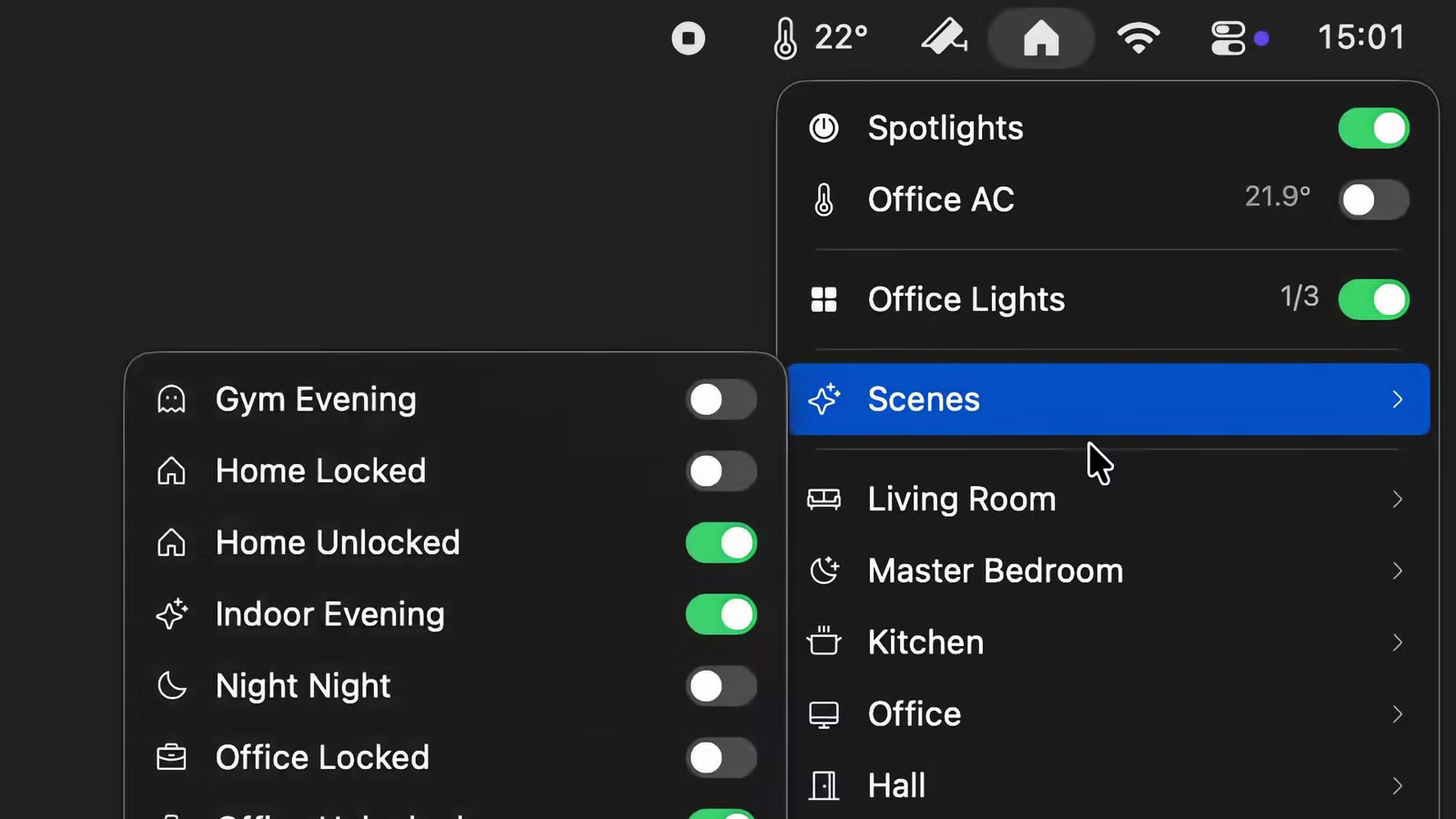
If you use smart home devices and have space for one more icon in your Mac’s menu bar, Itsyhome Mac menu bar utility is worth a look. This lightweight app lets you control HomeKit-compatible lights, thermostats, cameras, garage doors, and more—all with just a click or two. It even supports advanced automations via webhooks, Shortcuts, and custom scripts.
Launched in January with its 1.0 release, Itsyhome is a native macOS app built with AppKit. It works with any device you’ve added to the Apple Home app—meaning it supports HomeKit and Matter-enabled gear. If you use non-HomeKit devices through Home Assistant, you can still connect them using Home Assistant’s HomeKit Bridge.
The interface is clean and efficient. You can pin your most-used devices, scenes, or rooms to the top of the menu for instant access. Switching between multiple HomeKit homes is also seamless. Plus, Itsyhome Mac menu bar displays live video feeds from security cameras and doorbells directly in the dropdown—no need to open another app.
While macOS offers a basic Control Center in the menu bar, Itsyhome delivers far more flexibility. For power users, it includes deep integration tools. One standout feature is URL scheme support. You can toggle any device using a simple deeplink. For example, to turn off a lamp named “Lamp” in the “Living Room,” you’d use:
itsyhome://toggle/Living%20Room/Lamp
These URLs work with Apple Shortcuts, Stream Deck, Raycast, Alfred, and even Terminal commands. Just wrap the link in quotes and run open "itsyhome://..."—ideal for scripting or automation workflows.
Even better, Itsyhome runs a built-in HTTP server on your local network. This lets other devices—like a NAS or Raspberry Pi—control your smart home. For instance, a script could run:
curl http://192.168.50.87:8423/off/Bedroom/Lamp
to switch off a light remotely. (Note: for always-on reliability, a dedicated system like Home Assistant may be preferable—but Itsyhome’s option is handy for ad-hoc use.)
Itsyhome is available on the Mac App Store. The free version covers basic controls, while a one-time purchase unlocks pro features: live camera feeds, custom icons, iCloud sync, deeplink support, and Stream Deck integration. Source code is also open on GitHub for transparency and tinkering.
In short, if you’re deep into the Apple ecosystem and want faster, smarter access to your smart home from your Mac, the Itsyhome Mac menu bar app is a powerful—and surprisingly versatile—tool worth installing today.
READ: Samsung’s Hidden “Separate App Sound” Feature You’re Missing