BizmartOs
No Result
View All Result
  • Windows
  • macOS
  • Linux
  • Android
  • iOS
  • ChromeOS
  • Ubuntu
  • Debian
  • Fedora
  • BSD
  • Windows
  • macOS
  • Linux
  • Android
  • iOS
  • ChromeOS
  • Ubuntu
  • Debian
  • Fedora
  • BSD
No Result
View All Result
BizmartOs
No Result
View All Result

Home » Samsung’s Hidden “Separate App Sound” Feature You’re Missing

Samsung’s Hidden “Separate App Sound” Feature You’re Missing

Bizmart OS Staff by Bizmart OS Staff
5 months ago
in Android
Reading Time: 2 mins read
A A
Samsung’s Hidden “Separate App Sound” Feature You’re Missing

Modern Samsung phones come loaded with features—more than almost any other Android brand. While this gives power users endless ways to customize their experience, it also means some great tools go unnoticed. One such gem is Separate App Sound Samsung users can enable right now.

You may have missed it, but this feature has been around since the Galaxy S8 in 2017. It quietly lets you send audio from specific apps to different output devices—like playing music through Bluetooth while keeping notifications on your phone speaker.

Here’s how it works: imagine you’re streaming YouTube Music through a Bluetooth speaker, but you still want calls and alerts to play from your phone. With Separate App Sound Samsung, you can do exactly that. No more awkward interruptions during parties or quiet moments.

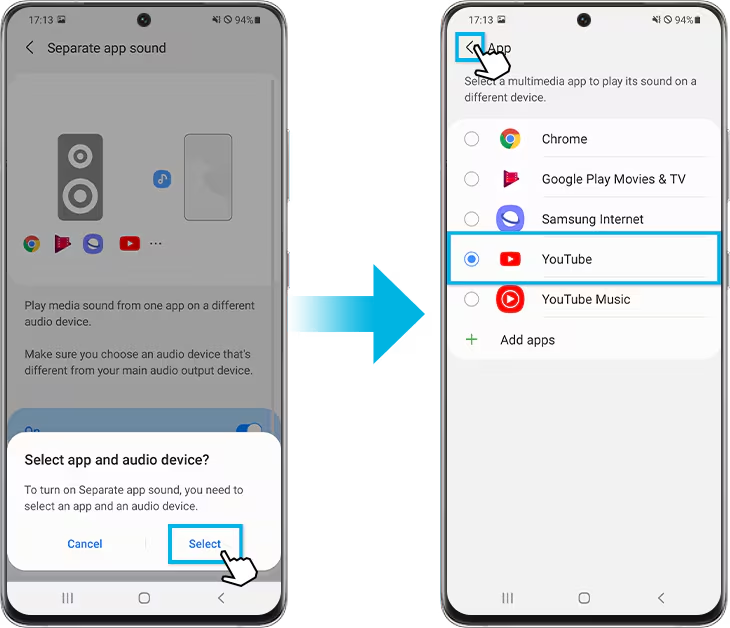
Setting it up is simple. First, open Settings on your Samsung phone. Then tap Sounds and vibrations. Scroll to the bottom and select Separate app sound. Toggle Turn on now, then tap Select on the pop-up. Choose which apps you want to redirect—and whether their audio should play through your phone or a connected Bluetooth device.

After setup, your phone may ask you to confirm a change in main audio output. For example, if you assign YouTube Music to your earbuds, your phone might switch its default speaker back to internal audio. That way, only your chosen apps use Bluetooth—everything else stays local.

Why does this matter? Consider real-life scenarios. If you’re hosting friends and playing music via Bluetooth, you won’t want text alerts blaring through the speaker. Or when driving with your partner, their Instagram reels won’t cut off the playlist if only music apps use the car’s audio system. During work calls on Teams or Google Meet, you can keep call audio in your earbuds while other sounds stay muted or private.

Despite its usefulness, no other major Android brand offers this level of per-app audio control. As a Pixel user, the author admits feeling envious—but Samsung owners can take full advantage today.

In short, Separate App Sound Samsung solves everyday audio conflicts with minimal effort. It’s powerful, practical, and surprisingly underused. If you own a Galaxy phone, try it—you’ll wonder how you lived without it.

READ: KDE Linux Gears Up for Beta with Plasma 6.6 and New Features
Previous Post

Itsyhome: Control HomeKit Devices from Your Mac Menu Bar

Next Post

Apple’s Long-Delayed Siri AI Upgrade Nears Release With iOS 26.4

Related Posts

Nothing Warp App Simplifies File Transfers
Android

Nothing Warp App Simplifies File Transfers

by Bizmart OS Staff
3 months ago
0

The launch of the Nothing Warp app highlights a growing demand for simple, cross-platform file sharing tools. As users juggle...

Read moreDetails
Android 17 Handoff Feature Brings Seamless Cross-Device Continuity
Android

Android 17 Handoff Feature Brings Seamless Cross-Device Continuity

by Bizmart OS Staff
5 months ago
0

Google has introduced a major cross-device upgrade with the Android 17 beta update. The new feature, called Handoff, enables users...

Read moreDetails
Pixel 10a Set to Shake Up the Midrange Market
Android

Pixel 10a Set to Shake Up the Midrange Market

by Bizmart OS Staff
5 months ago
0

The Pixel 10a is arriving at a moment when the smartphone industry is anything but calm. Rising component costs, tighter...

Read moreDetails
Google Introduces Automatic Downloads Backup in Android Update
Android

Google Introduces Automatic Downloads Backup in Android Update

by Bizmart OS Staff
5 months ago
0

Google has officially confirmed a long-awaited enhancement to Android’s backup system. With the latest Play System update, the company is...

Read moreDetails
Top Android Security Threats of 2026 and How to Stay Safe
Android

Top Android Security Threats of 2026 and How to Stay Safe

by Bizmart OS Staff
5 months ago
0

Android remains the world’s most widely used mobile operating system in 2026, powering billions of devices globally. However, its popularity...

Read moreDetails
Google’s Android PC Delayed Until 2028, ChromeOS Stays for Now
Android

Google’s Android PC Delayed Until 2028, ChromeOS Stays for Now

by Bizmart OS Staff
5 months ago
0

Google’s long-rumored Android PC is not coming anytime soon. Despite early excitement about Project Aluminium and its new operating system,...

Read moreDetails
Next Post
Apple’s Long-Delayed Siri AI Upgrade Nears Release With iOS 26.4

Apple’s Long-Delayed Siri AI Upgrade Nears Release With iOS 26.4

  • About
  • Privacy
  • Terms
  • DMCA
  • Advertise
  • Contact

© 2026 Bizmart OS

No Result
View All Result
  • Windows
  • macOS
  • Linux
  • Android
  • iOS
  • ChromeOS
  • Ubuntu
  • Debian
  • Fedora
  • BSD

© 2026 Bizmart OS