The new Gemini macOS app marks a significant step in bringing AI assistance directly into everyday workflows. With a native desktop experience, users can now access intelligent support without leaving their current tasks, making productivity more seamless and immediate.
Unlike browser-based tools, the Gemini macOS app integrates directly into the operating system. This allows users to call up the assistant instantly using a keyboard shortcut, reducing the need to switch between applications. As a result, workflows remain uninterrupted, and users can maintain focus on their work.
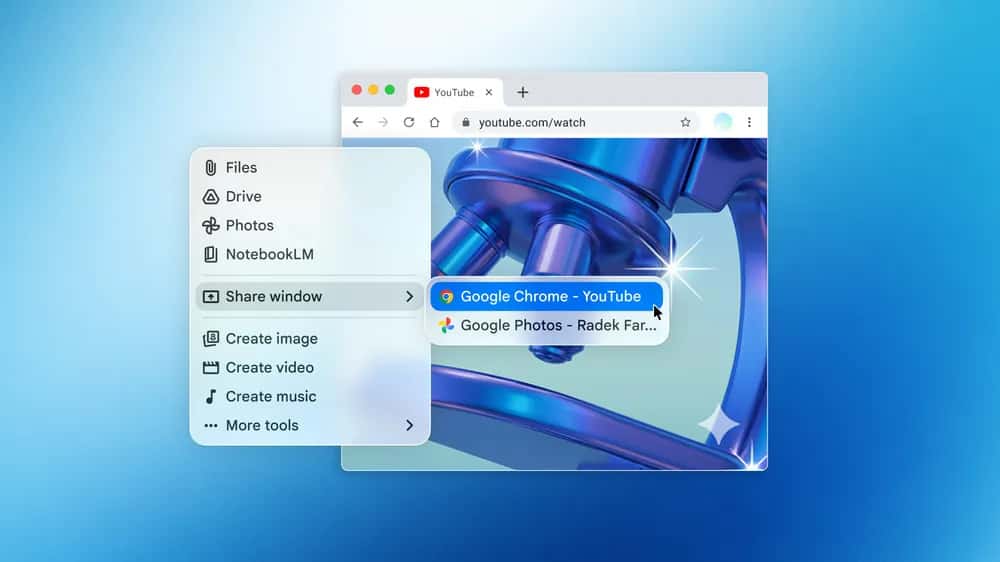
The app introduces a key feature that enhances context awareness. Users can share their screen or a specific window, enabling Gemini to analyze what is visible in real time. For example, someone reviewing a complex chart can ask for key insights and receive a clear summary within seconds. This capability transforms how users interact with data and visual content.
In addition, the Gemini macOS app supports interaction with local files. This means users can request help with documents, spreadsheets, or presentations directly from their desktop environment. By doing so, the assistant becomes a more practical tool for daily tasks rather than a separate utility.
Speed and accessibility define the experience. With a simple Option + Space shortcut, users can activate Gemini from anywhere on their Mac. This quick access removes friction and encourages frequent use, especially for tasks that require quick verification or calculation.
For professionals, this feature offers immediate value. A user drafting a report can confirm facts without opening a browser. Similarly, someone working on financial data can request formulas or calculations without leaving a spreadsheet. The Gemini macOS app streamlines these interactions, saving time and effort.
Creative workflows also benefit from this integration. The app allows users to generate images or videos without interrupting their process. Tools such as Nano Banana for image generation and Veo for video creation provide additional flexibility, enabling users to turn ideas into visual content quickly.
The release reflects a broader trend toward embedding AI directly into operating systems. By positioning the Gemini macOS app within the desktop environment, Google aims to make AI assistance more intuitive and accessible. Instead of acting as a separate tool, the assistant becomes part of the natural workflow.
Availability also plays a key role in adoption. The app is now accessible globally for users running macOS 15 or later. Importantly, it is offered at no cost, lowering the barrier to entry for individuals and businesses alike. This approach supports rapid adoption and encourages experimentation with AI-driven productivity tools.
The current version represents an early stage in development. Google has indicated that it plans to expand the app’s capabilities in the coming months. Future updates may introduce more proactive features, deeper personalization, and enhanced integration with other applications.
The Gemini macOS app signals a shift in how users interact with technology. Instead of navigating multiple tools, they can rely on a single assistant that adapts to their needs in real time. This evolution aligns with the growing demand for efficiency and simplicity in digital workflows.
Looking ahead, the success of such tools will depend on how well they balance automation with user control. While AI can handle repetitive tasks and provide insights, users still need clarity and reliability in its responses. Maintaining this balance will be essential for long-term adoption.
Ultimately, the Gemini macOS app delivers a practical example of how AI can integrate into daily work. By combining speed, context awareness, and ease of access, it offers a glimpse into the future of desktop computing, where assistance is always available, yet never intrusive.