The release of macOS Tahoe 26 marks a pivotal moment in Apple’s software evolution, bringing a host of exciting new features, an innovative design overhaul, and significant improvements across multiple apps. With its fresh Liquid Glass design, revamped Spotlight, and powerful new tools like Live Translation and Call Screening, macOS Tahoe 26 offers a modern, streamlined experience for Mac users, delivering better performance, smoother interactions, and greater cohesiveness across Apple’s entire ecosystem. Whether you’re a developer, creative professional, or casual user, this latest iteration of macOS promises to enhance your daily workflow in a way that’s both elegant and efficient.
A Glimpse at the Design Overhaul: Liquid Glass and Beyond
One of the most significant changes in macOS Tahoe 26 is the introduction of the Liquid Glass design—a visually captivating and functionally dynamic interface that redefines the Mac user experience. Liquid Glass isn’t just about aesthetic appeal; it’s designed to bring a new level of interactivity, subtlety, and fluidity to how users navigate their Macs.
What is Liquid Glass?
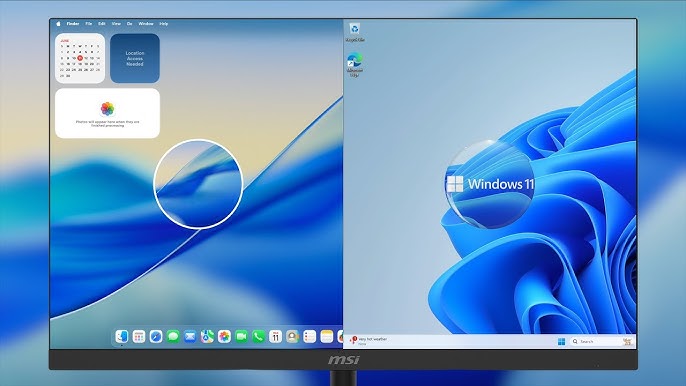
Liquid Glass is a translucent material that behaves like real glass, offering an ever-changing visual experience that dynamically adapts based on the surrounding content and light. Whether you’re scrolling through apps, browsing files, or simply navigating the system, Liquid Glass makes everything feel more fluid and immersive.
Some key features of Liquid Glass include:
- Translucency: It allows content to shine through interface elements, making them feel more integrated with the system’s overall design.
- Dynamic Light Reflection: The material reflects light and color, reacting to real-time movement. This provides a more immersive, fluid experience that feels alive as you interact with your Mac.
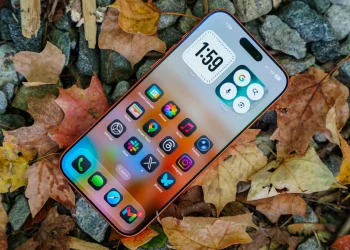
- Cross-Platform Consistency: Liquid Glass is not limited to macOS. It extends across all Apple devices, including iPhone, iPad, tvOS, watchOS, and macOS Tahoe 26, creating a cohesive and unified design language across the Apple ecosystem.
This design overhaul extends to desktop icons, folders, Dock, menus, and toolbars, all of which now feature translucent, glass-like effects that enhance both visual appeal and functionality.
Cross-Platform Cohesion: A Unified Apple Experience
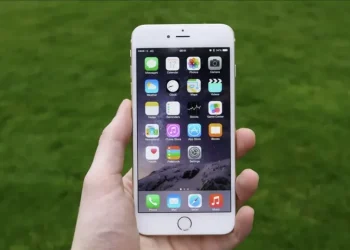
With the introduction of Liquid Glass, Apple ensures a more cohesive experience across all its operating systems. iOS, iPadOS, macOS, and even watchOS and tvOS share a unified aesthetic, so whether you’re switching from your iPhone to Mac or your Apple Watch to iPad, the transition between devices feels seamless.
This is particularly noticeable in the menu bar, Control Center, and app icons, where everything from light and dark modes to app layouts and navigational elements harmonize perfectly across all devices. Apple’s move to streamline design across multiple platforms is one of the standout features of macOS Tahoe 26, making it easier to switch between Apple products without a jarring shift in the interface.
Enhanced Spotlight Search: More Powerful Than Ever
Spotlight, one of the most powerful tools on the Mac, has received a major overhaul in macOS Tahoe 26. Previously, Spotlight served as a quick way to search for apps, files, and web content. Now, Spotlight is even more robust, integrating new features that make it an indispensable tool for productivity and efficiency.
Spotlight Updates:
- Improved Search Functionality: Spotlight now includes results from a variety of sources, such as files, apps, messages, and third-party cloud services. Search results are ranked based on relevance and can be filtered by content type.
- Quick Actions: Spotlight can now perform actions directly from its interface, such as sending emails, creating notes, playing podcasts, or adding calendar events—all without opening an app. This makes Spotlight an even more efficient way to get things done.
- Clipboard History: A new feature in Spotlight tracks your clipboard history, allowing you to quickly access and paste previously copied text, links, and other content. This makes managing your workflow faster and more streamlined.
In addition to these improvements, Spotlight can also execute actions with Quick Keys, or short strings of characters, making it easier to trigger frequent tasks like opening apps or sending messages without lifting a finger.
App Enhancements: Smarter, More Interactive Tools
macOS Tahoe 26 enhances a number of core apps, giving them new functionality and smoother, more intuitive interfaces.
Messages App Enhancements:
The Messages app on macOS receives several new features that improve communication and collaboration:
- Custom Backgrounds: Personalize your conversations with custom backgrounds that are synced across devices, allowing for a more personalized messaging experience.
- Polls: You can now create polls in group chats to make decisions quickly and easily. The app supports up to 12 options for voting, with real-time updates.
- Live Translation: Just like iOS 26, macOS Tahoe adds Live Translation for multilingual conversations, making communication across languages more accessible.
- Spam Filtering: Spam messages are now categorized separately from other messages, allowing users to manage their inbox more efficiently.
Phone App Comes to the Mac:
For the first time, macOS users can answer and make calls directly from their Mac, thanks to the addition of the Phone app in macOS Tahoe 26. Calls are routed through Wi-Fi calling, allowing for seamless integration between your iPhone and Mac.
Notable features include:
- Call Screening: When you receive an unknown call, the Phone app will ask the caller for their name and reason for calling, letting you decide whether to answer.
- Hold Assist: If you’re placed on hold, the app can stay on the line for you and notify you when a live agent is available, saving you from listening to endless hold music.
Gaming Features: A New Era for Apple’s Gaming Platform
macOS Tahoe 26 introduces an all-new Games app, designed to provide a central hub for both Mac App Store and Apple Arcade titles. The Game Overlay feature enables users to adjust system settings, chat with friends, and invite others to play—all without leaving the game.
Additionally, Metal 4 introduces advanced graphics, faster frame rates, and improved rendering technologies, making macOS Tahoe 26 an ideal platform for next-generation games.
New AI Features: Apple Intelligence at Work
Apple continues to integrate AI across its operating systems, and macOS Tahoe 26 is no exception. Apple Intelligence brings several new features to macOS that increase its efficiency and capabilities:
- Genmoji: This feature allows users to create custom emojis by combining existing ones or adding descriptions to generate completely new, personalized emojis.
- Image Playground: Powered by ChatGPT, Image Playground enables users to create images in a variety of artistic styles, right on their Mac.
- Writing Tools: For those who use macOS for writing, Writing Tools provides advanced grammar and tone suggestions, making it easier to refine text.
Accessibility Enhancements: Making macOS More Inclusive
Apple remains committed to accessibility, and macOS Tahoe 26 introduces several new features designed to make the Mac more inclusive for all users:
- Magnifier on Mac: This new tool allows users to magnify portions of the screen for easier reading and interaction.
- Braille Access: macOS Tahoe 26 improves support for Braille displays, making it easier for users with visual impairments to navigate their devices.
- Accessibility Reader: A new feature that provides a more comprehensive view of text for users with reading difficulties.
Other Notable Features in macOS Tahoe 26
- Terminal Updates: The new Terminal now supports 24-bit color and Powerline fonts, making it more versatile for developers and advanced users.
- New App Library: The Applications interface now categorizes apps into groups like Productivity, Finance, and Entertainment, making it easier to organize and find your software.
- Control Center and Menu Bar: The customizable Control Center and Menu Bar let you organize and access essential tools and apps, including third-party controls.
A Powerful Update for the Mac Ecosystem
macOS Tahoe 26 brings a wealth of new features, design improvements, and AI-driven innovations to the Mac. With the stunning Liquid Glass design, enhanced app experiences, and improved performance, macOS Tahoe 26 sets a new standard for Apple’s desktop operating system. Whether you’re looking for better gaming performance, more powerful AI tools, or a sleeker, more cohesive user interface, macOS Tahoe 26 delivers on all fronts.
As we move into 2026, macOS Tahoe 26 promises to continue evolving, offering even more capabilities and refinements in future updates. For anyone using a Mac, this update marks an exciting leap forward in both design and functionality.