Rumors are swirling about Apple homeOS, a potential new operating system designed to power the next Apple homeOS is a long-rumored operating system designed for future smart home devices. This new software promises to power Apple’s ambitious push into home robotics and integrated hubs. Importantly, it aims to unify the Apple experience within your home like never before. Let’s explore the leaks and reports surrounding this exciting development.
Why Apple Needs a Dedicated homeOS
Apple already uses several operating systems. For example, your iPhone runs iOS, and your Apple TV runs tvOS. However, these platforms were not originally designed as dedicated home hubs. Consequently, Apple homeOS represents a fresh start. It will provide a native foundation for always-on, shared home devices. This strategic move will help Apple compete more effectively with giants like Google and Amazon in the smart home arena.
Key Features and User Interface
Reports suggest that Apple homeOS will blend the best elements of Apple’s existing software. Specifically, it will merge the media capabilities of tvOS with the glanceable interface of watchOS.
- Unique App Layout: Expect a hexagonal grid for apps, much like the Apple Watch. This design is perfect for quick, touch-based interactions.
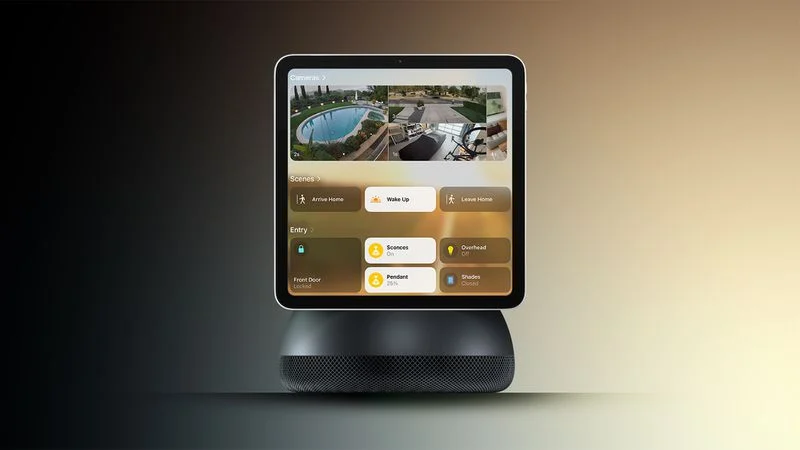
- Focus on Widgets: The home screen will prioritize widgets and clock faces. Therefore, users will get weather, calendar, and smart home controls at a glance.
- Dual Control Methods: You will primarily control devices using Siri voice commands. Additionally, a touch interface will be available for precise input.
- Built-in Apps: Core apps will likely include Calendar, Camera, Music, Reminders, and Notes. This turns the device into a true family communication center.
Breakthrough Multi-User Support
The most impressive feature could be its advanced multi-user support. This system uses facial recognition for automatic personalization.
Devices with Apple homeOS will include a front-facing camera. As a user approaches, the camera identifies them. Then, the interface instantly changes to display that person’s specific preferences, layout, and content. Consequently, everyone in the household enjoys a perfectly personalized experience without touching a button.
Hardware: What Will Run homeOS?
This new software needs innovative hardware. Currently, rumors point to two main products:
- A Smart Display Hub (2026): This device will act as a central home command center. It will likely feature a screen and more advanced sensors than a HomePod.
- A Mobile Tabletop Robot (2027): This ambitious product could freely move around your home. It may handle FaceTime calls, home monitoring, and more.
Release Timeline and Expectations
Do not expect an immediate launch. The first Apple homeOS device probably will not arrive until 2026. However, we may learn more details through leaks in the coming months. Ultimately, Apple will likely unveil the software at a future WWDC event before any hardware launch.
In summary, Apple homeOS is a clear signal of Apple’s serious commitment to dominating the smart home. It promises a more intuitive, personalized, and powerful way to interact with technology where it matters most—at home.
READ: Most Secure Operating System 2025: Comparing OS Security Leaders