BizmartOs
No Result
View All Result
  • Windows
  • macOS
  • Linux
  • Android
  • iOS
  • ChromeOS
  • Ubuntu
  • Debian
  • Fedora
  • BSD
  • Windows
  • macOS
  • Linux
  • Android
  • iOS
  • ChromeOS
  • Ubuntu
  • Debian
  • Fedora
  • BSD
No Result
View All Result
BizmartOs
No Result
View All Result

Home » Microsoft Is Experimenting With a Windows 11 PowerToys Shortcut

Microsoft Is Experimenting With a Windows 11 PowerToys Shortcut

Bizmart OS Staff by Bizmart OS Staff
5 months ago
in Windows
Reading Time: 2 mins read
A A
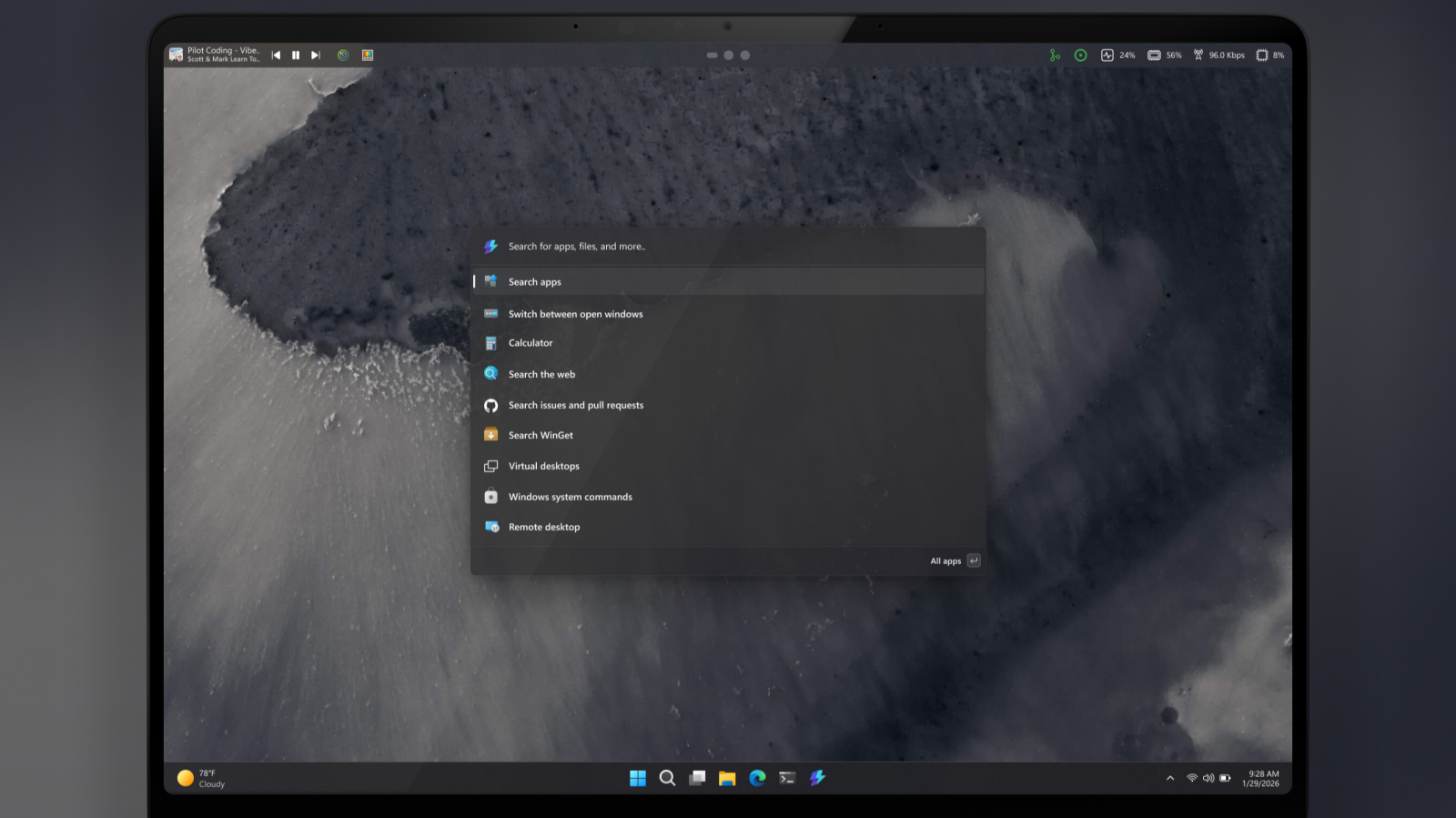
Windows 11 PowerToys shortcut

(Credit: Niels Laute)

Microsoft’s PowerToys team is experimenting with a new feature for Windows 11. They are testing a “Command Palette Dock” that would sit at the top of the desktop. This customizable dock would give users quick access to PowerToys features, media controls, and more, eliminating the need to open the Quick Settings menu.

What Is the Windows 11 PowerToys Shortcut?

PowerToys are tools that improve the functionality of Windows. These include advanced copy-and-paste options, a color picker, and custom desktop layouts. The new experiment involves adding a top-mounted dock, similar to a secondary taskbar, that lets users access features like CPU and memory metrics, clipboard history, and media controls with ease.

How the Command Palette Dock Works

The new PowerToys feature is highly customizable. You can enable it from the Command Palette settings and pin it to any edge of the screen. The dock lets you pin your favorite tools, adjust backgrounds, and switch between different themes. You can also move the dock’s position, placing it at the left, right, or bottom of the screen.

Niels Laute, a senior product manager at Microsoft, explained this feature on the PowerToys GitHub page. He mentioned that the Command Palette Dock allows users to access tools quickly without interrupting their workflow. This method saves time compared to opening the Command Palette every time.

Can the Windows Taskbar Be Moved?

The new dock feature has led to some frustration. Many users are asking, “Why can’t we just move the standard Windows taskbar?” Windows 10 allowed users to drag the taskbar to the side of the screen and position it vertically. However, Windows 11 removed this option. Some see this new PowerToys feature as a possible step toward restoring the ability to move the taskbar.

Where to Try the Feature

Currently, this feature is still in the experimental stage. Users can try it by accessing the dev/migrie/f/powerdock branch of PowerToys. Check the PowerToys GitHub page for more updates as the team refines the feature based on user feedback.

Read Also

Apple Introduces New Privacy Setting
Aluminium OS: A New OS for the Future

Though not yet confirmed for wide release, this PowerToys feature offers an interesting way for Windows 11 users to streamline their desktop experience. It promises faster access to tools, making the workflow smoother.

Previous Post

Can Linux Gaming Really Take On Windows? One Collective Is Betting Yes

Next Post

Apple Patches iOS Versions Over a Decade Old: What It Means for Your Old iPhone

Related Posts

Windows 11 update
Windows

Windows 11 Update Brings Major Speed Gains

by Bizmart OS Staff
2 months ago
0

Microsoft has released a new Windows 11 update that introduces a major performance improvement designed to make PCs feel faster...

Read moreDetails
Windows 11 Secure Boot Status Update Explained
Windows

Windows 11 Secure Boot Status Update Explained

by Bizmart OS Staff
3 months ago
0

The new Windows 11 Secure Boot status feature adds a critical layer of visibility to system security in the April...

Read moreDetails
PeekDesktop Brings macOS Feature to Windows
Windows

PeekDesktop Brings macOS Feature to Windows

by Bizmart OS Staff
3 months ago
0

The arrival of PeekDesktop Windows introduces a simple but powerful feature that many users have long wanted. With a single...

Read moreDetails
Secure Boot status
Windows

Windows Security Update Shows Secure Boot Status

by Bizmart OS Staff
3 months ago
0

Microsoft has begun rolling out a major Windows Security update that introduces clearer visibility into Secure Boot status across supported...

Read moreDetails
Windows Defender Zero Day Threat Exposed
Windows

Windows Defender Zero Day Threat Exposed

by Bizmart OS Staff
3 months ago
0

The Windows Defender zero day vulnerability known as BlueHammer has raised serious concerns across the cybersecurity community. As a result,...

Read moreDetails
Windows 11 Local Account Setup Guide
Windows

Windows 11 Local Account Setup Guide

by Bizmart OS Staff
4 months ago
0

Windows 11 local account setup remains a key concern for users who prefer privacy and control over their devices. Although...

Read moreDetails
Next Post
Apple Patches iOS Versions Over a Decade Old: What It Means for Your Old iPhone

Apple Patches iOS Versions Over a Decade Old: What It Means for Your Old iPhone

  • About
  • Privacy
  • Terms
  • DMCA
  • Advertise
  • Contact

© 2026 Bizmart OS

No Result
View All Result
  • Windows
  • macOS
  • Linux
  • Android
  • iOS
  • ChromeOS
  • Ubuntu
  • Debian
  • Fedora
  • BSD

© 2026 Bizmart OS