BizmartOs
No Result
View All Result
  • Windows
  • macOS
  • Linux
  • Android
  • iOS
  • ChromeOS
  • Ubuntu
  • Debian
  • Fedora
  • BSD
  • Windows
  • macOS
  • Linux
  • Android
  • iOS
  • ChromeOS
  • Ubuntu
  • Debian
  • Fedora
  • BSD
No Result
View All Result
BizmartOs
No Result
View All Result

Home » Windows 11 to Get Movable and Resizable Taskbar in 2026

Windows 11 to Get Movable and Resizable Taskbar in 2026

Bizmart OS Staff by Bizmart OS Staff
5 months ago
in Windows
Reading Time: 2 mins read
A A
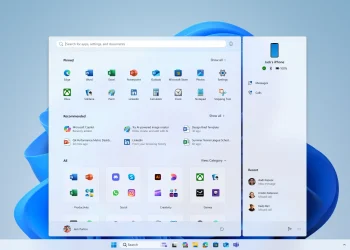
Windows 11 to Get Movable and Resizable Taskbar in 2026

Image source: Windowslatest

After years of user frustration, Microsoft is restoring a classic Windows feature. The movable taskbar in Windows 11 will return in summer 2026. Users will be able to place it on the left, right, top, or bottom of the screen. Additionally, they will finally be able to resize it.

For context, taskbar positioning has been part of Windows since the 1990s. Its removal in Windows 11 drew strong criticism. Power users especially missed vertical or top-aligned layouts. Now, Microsoft is responding as part of a broader trust-rebuilding effort after a difficult 2025.

This update won’t simply copy the past. The modern Windows 11 taskbar includes Cross Device Resume, Copilot, Phone Link, and dynamic system icons. Therefore, Microsoft must ensure all these features work correctly in every orientation. Internal reports confirm the team is actively adapting them for full compatibility.

Moreover, the taskbar will support true resizing. Many users want a slimmer bar to save screen space—but not hide it completely. Currently, “small taskbar buttons” only shrink icons, not the bar itself. The new option will reduce overall height and spacing, offering real customization.

This dual upgrade—movement and resizing—is now a high-priority project. Microsoft has assigned extra engineering resources to deliver it reliably. The challenge is significant: apps and system UI must adjust dynamically without breaking layout or usability.

Originally, Microsoft skipped the movable taskbar in Windows 11 for design reasons. Early architects favored a “symmetric panes” layout. Start sat center, widgets went left, and system controls stayed right. They believed other placements would disrupt visual balance. Rebuilding the taskbar from scratch also made side or top alignment seem too complex at launch.

Yet user feedback was overwhelming. The top-voted request in the Windows Feedback Hub asks exactly for this feature. In response, Microsoft is not just reversing course—it’s committing fully to technical execution.

The rollout is planned for summer 2026. Timelines could shift due to complexity. Still, the investment itself is meaningful. It shows Microsoft is returning to user-centric design after years of rigid control.

Equally promising is the wider 2026 roadmap. Expect better performance, improved gaming, stronger security, and less intrusive Copilot integration. Together, these signal that Windows 11 may finally meet its potential—not through revolution, but thoughtful refinement.

In short, the return of the movable taskbar in Windows 11 is more than nostalgia. It reflects a renewed respect for user choice—a principle long central to Windows’ success.

READ: Microsoft Rolls Out Copilot Shim for Mac Enterprise Users
Previous Post

Microsoft Rolls Out Copilot Shim for Mac Enterprise Users

Next Post

Google Introduces Automatic Downloads Backup in Android Update

Related Posts

Windows 11 update
Windows

Windows 11 Update Brings Major Speed Gains

by Bizmart OS Staff
2 months ago
0

Microsoft has released a new Windows 11 update that introduces a major performance improvement designed to make PCs feel faster...

Read moreDetails
Windows 11 Secure Boot Status Update Explained
Windows

Windows 11 Secure Boot Status Update Explained

by Bizmart OS Staff
3 months ago
0

The new Windows 11 Secure Boot status feature adds a critical layer of visibility to system security in the April...

Read moreDetails
PeekDesktop Brings macOS Feature to Windows
Windows

PeekDesktop Brings macOS Feature to Windows

by Bizmart OS Staff
3 months ago
0

The arrival of PeekDesktop Windows introduces a simple but powerful feature that many users have long wanted. With a single...

Read moreDetails
Secure Boot status
Windows

Windows Security Update Shows Secure Boot Status

by Bizmart OS Staff
3 months ago
0

Microsoft has begun rolling out a major Windows Security update that introduces clearer visibility into Secure Boot status across supported...

Read moreDetails
Windows Defender Zero Day Threat Exposed
Windows

Windows Defender Zero Day Threat Exposed

by Bizmart OS Staff
3 months ago
0

The Windows Defender zero day vulnerability known as BlueHammer has raised serious concerns across the cybersecurity community. As a result,...

Read moreDetails
Windows 11 Local Account Setup Guide
Windows

Windows 11 Local Account Setup Guide

by Bizmart OS Staff
4 months ago
0

Windows 11 local account setup remains a key concern for users who prefer privacy and control over their devices. Although...

Read moreDetails
Next Post
Google Introduces Automatic Downloads Backup in Android Update

Google Introduces Automatic Downloads Backup in Android Update

  • About
  • Privacy
  • Terms
  • DMCA
  • Advertise
  • Contact

© 2026 Bizmart OS

No Result
View All Result
  • Windows
  • macOS
  • Linux
  • Android
  • iOS
  • ChromeOS
  • Ubuntu
  • Debian
  • Fedora
  • BSD

© 2026 Bizmart OS