BizmartOs
No Result
View All Result
  • Windows
  • macOS
  • Linux
  • Android
  • iOS
  • ChromeOS
  • Ubuntu
  • Debian
  • Fedora
  • BSD
  • Windows
  • macOS
  • Linux
  • Android
  • iOS
  • ChromeOS
  • Ubuntu
  • Debian
  • Fedora
  • BSD
No Result
View All Result
BizmartOs
No Result
View All Result

Home » Windows 11 SSD Upgrade Tips

Windows 11 SSD Upgrade Tips

Patricia Renee by Patricia Renee
8 months ago
in Windows
Reading Time: 2 mins read
A A
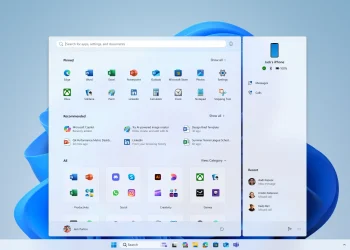
Windows 11 SSD.

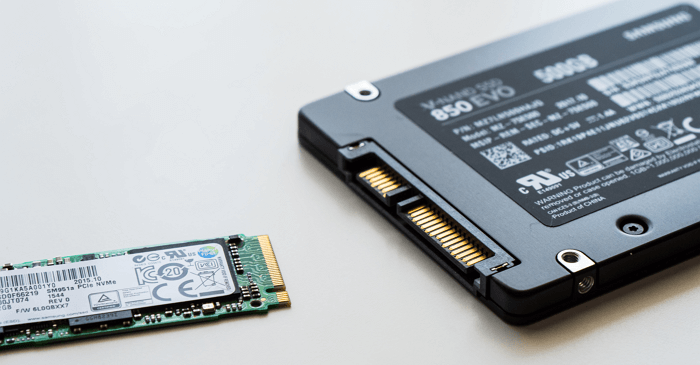
Windows 11 SSD setups have become a popular way for users to extend the life of their older hardware, especially when moving from Windows 10 to Windows 11. Many users find themselves with a spare SATA drive after upgrading to faster NVMe storage, and turning it into a Windows 11 SSD is one of the simplest ways to keep that older hardware useful without wasting money on additional components. This approach allows clean boundaries between two operating systems, smoother switching, and reliable performance for regular work.

Why a Windows 11 SSD Makes Sense

The idea of creating a separate Windows 11 SSD installation appeals to users who prefer a simple setup without dual-boot complications. Instead of installing both operating systems on one drive and risking Fast Boot or Secure Boot conflicts, a dedicated Windows 11 SSD avoids unnecessary errors. With this setup, the primary NVMe drive remains untouched, ensuring that work files, games, and productivity apps stay organized. This helps users switch systems quickly when testing new features or writing about Windows 11 without disrupting their main OS.

How Older SSDs Run Windows 11 Smoothly

A Windows 11 SSD does not need to be the fastest piece of hardware. Even a SATA model from 2018 loads apps smoothly and handles daily tasks with no difficulty. Although NVMe drives offer up to thirty times faster transfer speeds, the real-world difference for general usage is much smaller. Tasks like browsing, writing documents, or attending meetings run well on any decent SSD. Because of this, older drives remain valuable for secondary installations, especially for users who only need Windows 11 occasionally for lighter tasks.

Giving Old Drives a New Purpose

A Windows 11 SSD installation is also a smart way to repurpose hardware. Many older SATA drives, once used as the main system disk, still have years of life left. Installing Windows 11 on them prevents waste and provides a dedicated environment for testing features, comparing versions, or running apps that work better on Windows 11. This makes old storage useful, keeps the main drive free from clutter, and maintains stability in both systems.

Windows 11 SSD setups continue to be a reliable solution for users who switch between operating systems regularly. Even as NVMe technology advances, older SATA drives still play a meaningful role, offering flexibility and longer value for everyday computing tasks.

Tags: hardwarePCsstoragetechWindows 11 SSD
Previous Post

6 Free Quality-of-Life Open-Source Apps For Every PC and Mac

Next Post

Why a Chromebook for Work Makes Sense Today

Related Posts

Windows 11 update
Windows

Windows 11 Update Brings Major Speed Gains

by Bizmart OS Staff
1 month ago
0

Microsoft has released a new Windows 11 update that introduces a major performance improvement designed to make PCs feel faster...

Read moreDetails
Windows 11 Secure Boot Status Update Explained
Windows

Windows 11 Secure Boot Status Update Explained

by Bizmart OS Staff
3 months ago
0

The new Windows 11 Secure Boot status feature adds a critical layer of visibility to system security in the April...

Read moreDetails
PeekDesktop Brings macOS Feature to Windows
Windows

PeekDesktop Brings macOS Feature to Windows

by Bizmart OS Staff
3 months ago
0

The arrival of PeekDesktop Windows introduces a simple but powerful feature that many users have long wanted. With a single...

Read moreDetails
Secure Boot status
Windows

Windows Security Update Shows Secure Boot Status

by Bizmart OS Staff
3 months ago
0

Microsoft has begun rolling out a major Windows Security update that introduces clearer visibility into Secure Boot status across supported...

Read moreDetails
Windows Defender Zero Day Threat Exposed
Windows

Windows Defender Zero Day Threat Exposed

by Bizmart OS Staff
3 months ago
0

The Windows Defender zero day vulnerability known as BlueHammer has raised serious concerns across the cybersecurity community. As a result,...

Read moreDetails
Windows 11 Local Account Setup Guide
Windows

Windows 11 Local Account Setup Guide

by Bizmart OS Staff
3 months ago
0

Windows 11 local account setup remains a key concern for users who prefer privacy and control over their devices. Although...

Read moreDetails
Next Post
Chromebook for Work

Why a Chromebook for Work Makes Sense Today

  • About
  • Privacy
  • Terms
  • DMCA
  • Advertise
  • Contact

© 2026 Bizmart OS

No Result
View All Result
  • Windows
  • macOS
  • Linux
  • Android
  • iOS
  • ChromeOS
  • Ubuntu
  • Debian
  • Fedora
  • BSD

© 2026 Bizmart OS